What Is A GMT Watch?
A GMT watch is an analogue watch has a special complication that allows you to read two times at once.
The watch first came about in the 1980s and was initially designed for airplane pilots who would be crossing time zones.
Since then it has been popular with frequent travellers and people who have friends, family and business in other time zones.
The watch is named after the time zone that all other times where set off. GMT stands of Greenwich Mean Time and was the “international standard time” that we all other set clocks around the world where set from.
All other time zones are either plus or minus from this. (For example New York is -5 hours from GMT and Paris is +1 hours)
In 1972 GMT was actually replaced with UTC, the Coordinated Universal Time, which is basically the same but since I’m British, it’s still GMT to me.
The idea of the watch was that you would always have one hand showing the GMT time and then you would set the other hands to whatever time zone you where in at that time. The reality is you can use it to track time in a number of ways, which I will of course discuss below.
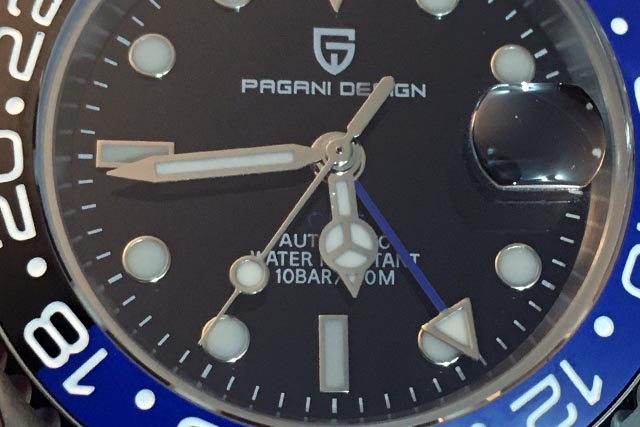
What Are the The 4 Hands Of A GMT?
The main feature of a GMT watch is the addition of an extra hand.
There is the usual hour, minute and second hands that we are all used to.
Then there is a fourth hand, called the GMT hand. It’s usually a different colour than the other hands to denote that it is different (mine is blue)
The GMT Hand
The GMT hand is effectively an hour hand, but it is different than the normal hour hand as it moves at a different pace.
A normal hour hand will move around the whole dial once every 12 hours. A GMT hand will do this in 24 hours.
This is important as it will allow you to track a timezone when one might be in the AM, while the other could be in the PM. It will also make sure you know if you are in the same day or not, as a timezone ahead of you will reach midnight (and therefore tomorrow) before you.
Depending on what model of watch you have, the GMT and Hour hand can be be independently moved of each other or a “slaved” to the each other.
Generally the GMT hand can be independently moved, but people will consider a watch a “true” GMT if the hour hand can be move independently. The difference may not seem important, but being able to move it independently allows you to have better freedom to track different time zones which I will go into more detail in the examples below.
The Bezel
The bezel is a fundamental part of the GMT watch. The bezel will be numbered 0-24 and will turn in both directions. This is to allow you to track the time in the second time zone.
Remember I said that the GMT hand goes around the dial once every 24 hours, these two are designed to work together.
A lot of bezels are designed with two colours. One half will be one colour and the other half another. It doesn’t really matter what the colour is, but the two colours are meant to help you quickly see the difference between “Day and night”. If you look at where the colour changes, it is on 6 and 18 this means that it’s not exactly an AM/PM split but it can still be pretty helpful, especially if you are not the quickest at reading the 24 hour time.
Half Time Zones
There are a number of time zones around the world that are not just a simple -/+ 1 hour. They are -/+1hr 30 minutes.
There are even a couple that have a 45minute difference.
Unfortunately you are not going to be able to track these areas with a GMT watch. As it is only the hour hand that we have two of, you can’t allow for any variation in minutes (Since there is only one minute hand)
If you do want to track a place in one of these half times you will have to set the hour and then manually calculate the +/- 30 or 45 minutes, which to be honest, I think I would struggle with, but it is possible. You might just need to stop and think a little bit before knowing the exact time in these areas.
How To Use A GMT Watch To Track Two Time Zones
There are a number of different ways you can set the watch up. There is no “correct” way as such (although some will argue you need the GMT be to set to read GMT, since that is what it is called).
So long as you understand what you have done and can read the time in the different time zones you have set, then you are using the watch as it is meant to be.
Keeping Track Of GMT
Normal hour hand – your local time – Read as a normal watch
GMT hand – GMT time – Use the bezel to tell the time
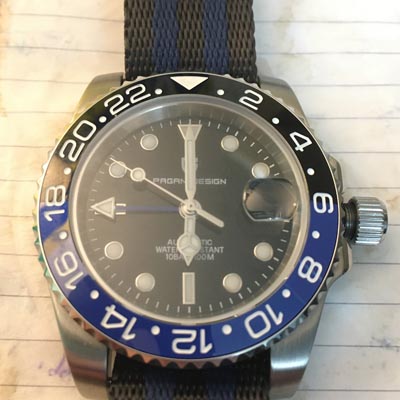
(I have a Pagani Design as I cant afford a luxury watch)
If you have a true GMT you can move around the world and change the normal hour hand to read the time wherever you are, while the GMT will always read GMT.
My watch is slaved, so if I went to Paris and changed the time forward one hour to be to 7pm, my GMT hand would also move forward an hour and read 1900. Not exactly ideal. Luckily my GMT hand can be moved independently. This means I would need to change the normal hour hand forward to be on Paris time, then adjust the GMT back an hour to return it to GMT. So slightly annoying, but this why true GMTs are pretty expensive compared to the cheap one I have.
If we look at the above picture again, where both hands are reading the same time this can sill be useful. If I woke up in a room with no windows, I can look at my watch and see it is 6 o’clock, but is it 6 in the morning or afternoon?
I can then look at the GMT hand and see it is pointing at 18, meaning 6PM. That’s probably never going really happen, but I am sure someone out there will find this useful.
Keep Track Of A Different Time Zone
If you are not interested in GMT but you want to know the time in New York, you can set the watch accordingly.
Normal hour hand – your local time – read as a normal watch
GMT hand – New York time (or any other time zone you are tracking) – use the bezel to tell the time
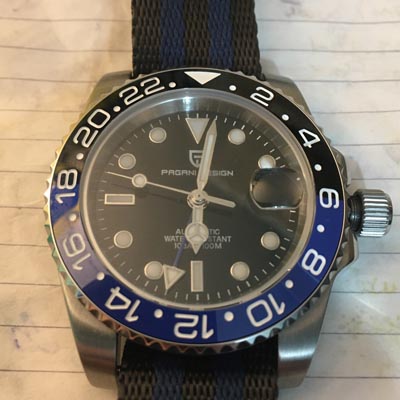
If you are like me and don’t get out much, you can keep your normal time as it is, then change the GMT to wherever you are tracking.
As you can see you can now basically set your normal hour hands to whatever time you need and have the GMT hand also at whatever time zone you want. You can use it to track your friends overseas, or you can use it to track your home time, when you are overseas. It totally depends what you want to do.
If you watch is slaved, this is the easier way to do things. You keep the normal hour to you local time and move the GMT to where it needs to be. Basically a slaved GMT is good for tracking another timezone from home, but a little more annoying if you are actually travelling.
Bezel Moving
This is going to upset those of you who love your bezel to be perfectly aligned at 12, but sometimes you just got to move it.
This method is especially important it your GMT hand is slaved to the hour hand. You just need to rotate your bezel by the number of hours you are trying to track.
Lets say you travel from London to somewhere that is -6 GMT. Lets say Dallas Texas. You get off the plane and change your normal hour hand to read the local time in Dallas which is 6am. The problem is your GMT how reads 0600 too.
Instead unscrewing the crown again and changing the GMT hand back to London, you can simply twist the bezel until its reads the GMT time again (or what ever time zone you need)
It can be a little confusing. I have traveled -6 hours, so I need to twist the bezel +6 hours to cancel it out and get get back to GMT which is basically zero.
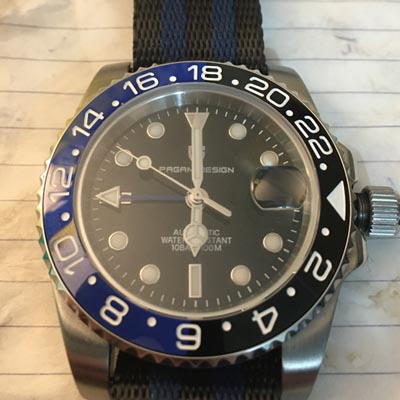
You can also use this method when you are at home. You can just keep your hour hand and GMT at local time then quickly twist the bezel to read what ever timezone you need, which is what I will explain next.
Tracking A 3rd Time Zone On A GMT
This can get a little tricky, and you can’t actually have all 3 time zones on display at the same time, but it can be possible to track 3, or even more.
So long as you know what timezone your two hands are in you can move the bezel accordingly to quick compensate for a 3rd region.
If we look at the picture below it shows 6pm UK time and I am using my GMT to track the time in New York, there is -5 hours difference there so the time was showing 13:00 for New York.
However, I know my friend is in LA and they are -8 hours behind the UK, but more importantly only -3 from New York, which is what I’m currently tracking with my GMT hand. This means i can quickly adjust the bezel 3 turns and change the watch was New York to LA. The GMT hand is now showing 10:00 which is the time in LA
I can then spin it back to align with the 12 o’clock again to reset it back to New York and it will show 13:00 again.

I could of course just do some quick maths, but sometimes it’s more fun (and less mentally challenging) to just move the bezel and read the time.
This is maybe a little confusing to follow in written form. Once you have the watch in your hand you can play around with it and check the time in different locations using your phone to confirm you are doing it right and making sense of it. You will understand it very quickly once you play start using it.
Conclusion
GMTs are super fun and I would really encourage you to get one. Of course you can get digital world timers, which was equally as fun, but there is something very cool about being able to look at an analogue watch and know the time in two places.
A lot of people think they are confusing or they are not really sure how to use them. Once you figure it out they are really simple and very useful.
(You can read more about the watch pictures in this article – Pagani Design GMT Watch Review)

Ian is the main writer at Horology Dream and is a lover all things watch related.
He has been a watch collector for over a decade and brings his knowledge and experience to this site to help you on your own watch collecting journey.
You can connect with him on Social media and talk anything watches or read more about him on his Author Page.